

S
Developer Docs
Discover how to get the most out of Divhunt for your unique needs, and explore the possibilities of building plugins to make Divhunt a better tool for everyone.
With Divhunt's system, you can create or re-create custom animations that are being used across the system and for 3rd-party plugins. Most basic example of animation would be fadeIn and fadeOut.
Creating Animation
Using code below, you can create new animation to module mdAnimations.
mdAnimations.OnReady(function()
{
    mdAnimations.ItemsAdd({
        id: 'fadeIn',
        name: 'Fade In',
        type: 'in',
        reverse: 'fadeOut',
        animate: function(item, target, duration, then)
        {
            target.animate([{opacity: '0'}, {opacity: '1'}], {duration, fill: 'forwards'}).onfinish = () =>
            {
                if(then) { then(item); }
            }
        }
    }, {
        id: 'fadeOut',
        name: 'Fade Out',
        type: 'out',
        reverse: 'fadeIn',
        animate: function(item, target, duration, then)
        {
            target.animate([{opacity: '1'}, {opacity: '0'}], {duration, fill: 'forwards'}).onfinish = () =>
            {
                if(then) { then(item); }
            }
        }
    });
});
Running Animation
Once animation has been created, you can test it by running it and providing few inputs such as DOM target, duration and delay.
mdAnimations.Fn('run', 'fadeOut', $('body'), 150, 0, (animation) =>
{
    // At this point, fadeOut animation has finished it's process
});
Some of animations will have reverse animation, for example fade animation can be in and out. When creating animations, we can specify if the animation has it's reverse, so when running animation we can check and call reverse animation if we need to.
mdAnimations.Fn('run', 'fadeOut', $('body'), 150, 0, (animation) =>
{
    let reverse = animation.Get('Reverse');

    if(reverse)
    {
        reverse.Fn('run', $('body'), 150, 0, () =>
        {
            // At this point fadeIn animation has finished it's process
        });
    }
});
Usage
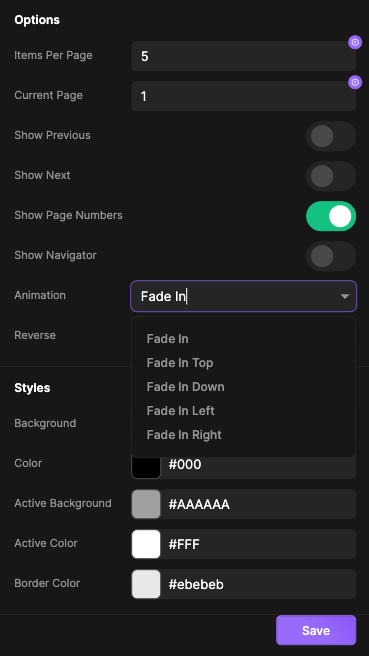
Animations module can be used manually as shown in example above, however, many of plugins will incorporate this system into their solutions as it gives modular approach to animations and it can be extended anytime long after plugin has been published. Following example indicates the animation list that can be used for pagination plugin
Methods and Functions
// View all animation objects
console.log(mdAnimations.ItemsGet());

// Get array list of animations - type ( 'in', 'out' or null )
console.log(mdAnimations.Fn('list', type));
Table of content